
blog/trends·Oct 23, 2026·6 min·by the eroq team
Halloween AI trends — the costume, pumpkin head and zombie ideas to make this week
The Halloween AI trends people are making right now, from the costume try-on to the pumpkin head photoshoot and the zombie love story, each with a prompt that opens in the studio.
Updated 23 October 2026. October is the busiest month of the year for AI photo and video trends: everyone wants a costume picture, a spooky clip or a pumpkin for a head, and nobody wants to spend an afternoon on makeup to get it. These are the Halloween AI trends worth making before the 31st, what each one is, and a prompt for each that opens in the studio, filled in, ready to render. Every one works from a photo of yourself, of a friend who agreed, or of a character you made.
AI Halloween costume try-on
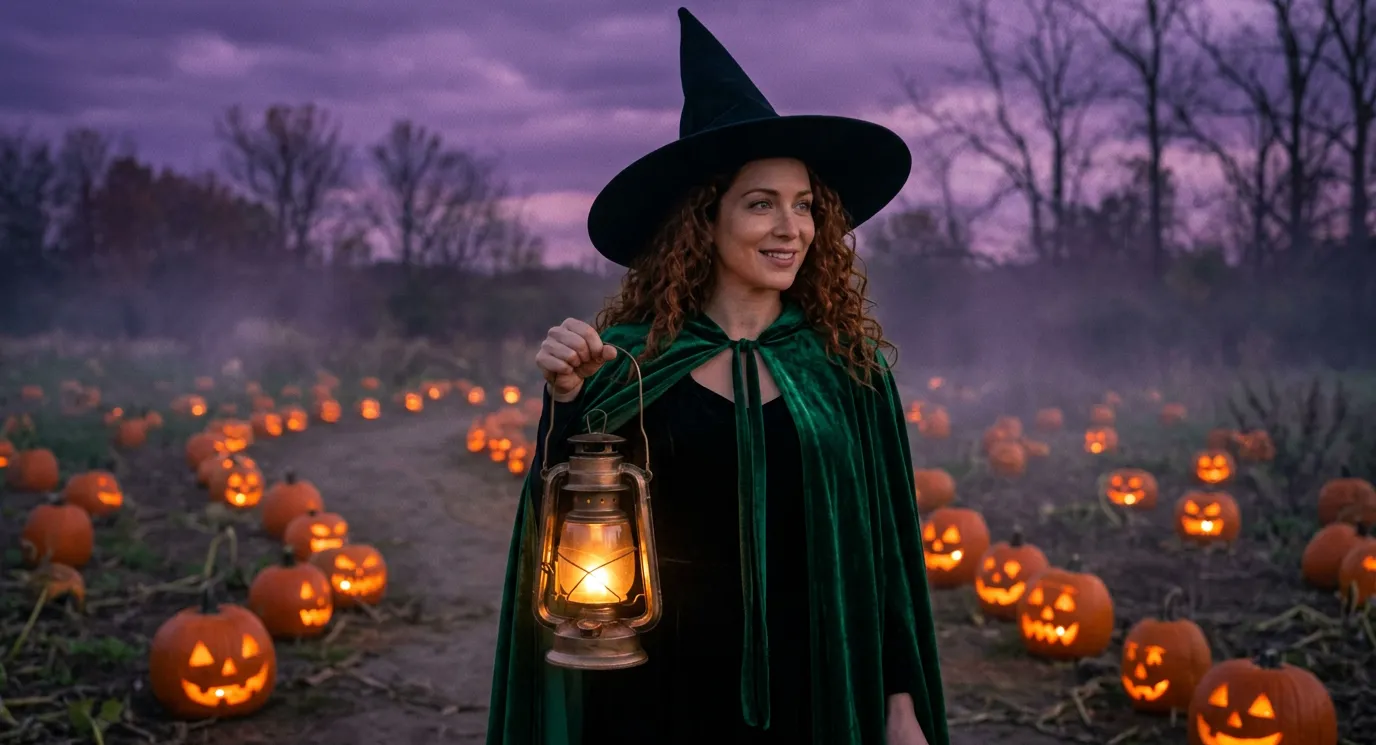
The biggest one, and the simplest: you, in a costume you do not own. A vampire countess at a candlelit masquerade, a witch in a pumpkin patch, a party zombie, half-skull face paint. Searches for an AI Halloween costume rise every day of October, peaking the week before Halloween. Drop your photo in the image studio as a reference so the face stays yours, then describe the costume:
The person in my reference photo as a modern witch walking through a misty pumpkin patch at dusk: a wide-brimmed pointed black hat, an emerald velvet cloak, a glowing brass lantern, dozens of carved jack-o'-lanterns glowing orange, purple sky, bare trees
Open this prompt in the image studio, or see every look on the AI Halloween costume generator page.
The pumpkin head photoshoot
Your usual outfit, your usual pose, and a carved jack-o'-lantern where your head should be: the pumpkin head photoshoot is the fall trend of couples and groups of friends. The AI version needs one full-body photo, no carving. In the Edit tab, ask for the head to change and everything else to stay:
Replace the head of the person in my photo with a large carved jack-o'-lantern glowing softly from inside; keep the outfit, the hands and the pose. Golden-hour autumn field, a hay bale, warm backlight, editorial fall photoshoot
Open it in the image studio. Couples, friends, the slow turn to the camera: the AI pumpkin head photoshoot page has the four looks.
The zombie love story
One of them turns into a zombie, the other hugs them anyway, then a hard cut to a golden memory. It took off at the start of October and the couple versions spread fastest. Make the first frame (a photo of the two of you, or two characters), then animate it with a prompt that keeps it tender rather than gory:
Rainy cabin porch at night: a man in movie-quality zombie makeup, grey-green skin and cloudy eyes, no blood, stands in the doorway; the woman facing him lowers her flashlight and hugs him anyway. Hard cut to the two of them laughing in a golden wheat field in summer
Open it in the video studio. The cut works best as two clips joined in the Editor: the zombie scene, then the summer one.
The 90s Halloween photo
A flash-lit Halloween snapshot from 1998: plastic fangs, a tube TV, orange string lights and the red date stamp in the corner. It works because it looks like a real photo from a shoebox.
1998 bedroom at night: the person in my reference photo sits on the carpet in plastic vampire fangs and a cape, the glow of a tube TV, orange string lights, harsh disposable-camera flash, a red date stamp in the corner reading 10 31 98
Open it in the image studio. For the slasher-poster version, ask for a 90s horror movie poster with your photo as the lead and a title of your own.
Catrina, for the Day of the Dead
The elegant Catrina portrait runs from Halloween to the Day of the Dead on November 2: fine skull face paint with floral detail, roses and marigolds, black lace. Treat it as a portrait, not a costume gag.
The person in my reference photo as an elegant Catrina: fine white skull face paint with floral detail, a crown of red roses and marigolds, a black lace gown, a lit candle in hand, a marigold altar with papel picado behind, warm candlelight
Open it in the image studio, then press Animate for the slow walk under an arch of marigolds.
Werewolf, vampire, witch on a broom
The transformations every effects catalogue leads with in October. Start from a photo as the first frame and describe the change; the Effects tab of Video holds the camera tricks (Melting, Vanish, Burning man) that pair well with them.
Full moon over a misty pine forest: the man in the first frame looks up, his eyes turn amber, grey fur spreads along his jaw and he becomes a werewolf and howls at the moon, no blood, slow push-in
Open the werewolf in the video studio or the witch on a broom.
Your pet in costume
A dog in a pumpkin suit, a cat in a witch hat on a pile of old books: the pet versions are the least crowded corner of the trend, and the most shared.
My dog from the photo in a plush pumpkin costume with a green stem hat, sitting on porch steps beside glowing jack-o'-lanterns at warm dusk; keep its fur and markings
Open it in the image studio, with the photo of your pet attached.
Ceiling fan, Halloween edition
The ceiling fan outfit trend still runs, and October turns its outfits into costumes: witch, vampire, skeleton, pumpkin. The template keeps the original's pose and timing; name the costumes in the instruction, in order.
A horror clip of your own
Found footage, a reflection that does not follow, a figure in the fog: horror is the genre filtered tools soften most. eroq Motion One, our own engine, renders dark fiction within the acceptable-use policy.
Found-footage horror, night-vision green: a slow handheld walk down a dark hospital corridor at night, a flickering fluorescent tube at the far end, an empty wheelchair rolls a few inches on its own, then a tall thin figure steps into a doorway and freezes
Open it in the video studio, or see the shots that work on the AI horror video generator page.
The soundtrack
Trend clips borrow songs nobody may reuse. Write your own in the music studio and add a narrator or a whisper in the voice studio:
Spooky swing Halloween song: walking upright bass, theremin lead, finger snaps and a ghostly choir, 120 BPM, a chorus about a haunted house party
What we leave out
Some Halloween trends travel fast and still have no place here: costume swaps with celebrities or anyone who did not agree, family and children's versions (photos of minors are never allowed), gore and real-looking violence, pranks made to deceive, and branded characters and masks. Everything above works with people 18 or older, original characters and generic costumes.
What it costs
New accounts start with 40 free credits, no card: enough for a few costume pictures at 10 credits on Eroq Uncensored or 10 on Eroq One. Clips cost what their engine charges for the length, shown on the Generate button before you commit, and the credits come from a pack or a plan. A render that fails is refunded.
FAQ
What are the Halloween AI trends this year?
The AI costume try-on, the pumpkin head photoshoot, the zombie love story, the 90s Halloween photo, the Catrina portrait, werewolf and vampire transformations, pets in costume and the Halloween edition of the ceiling fan trend. Each one starts from a photo of yourself or a character.
Can I make an AI Halloween costume photo from my own picture?
Yes. Attach your photo as a reference in the image studio, describe the costume and the scene, and the face stays yours. Use your own photo or one of someone who agreed to it.
Can I do these trends with my kids?
No. Many Halloween trends show up with families, but photos of minors are never allowed on eroq. Every trend here works with people 18 or older (yourself, a couple, friends), with pets and with original characters.
Do I need to install an app?
No. Everything runs in the browser, in the studio: the image studio for the photos, the video studio for the clips, the Editor to cut them together.
How much does it cost?
New accounts get 40 free credits. A picture costs from 10 credits, and a clip what its engine charges for the length; packs start at $10.
 Image
ImageMake it in eroq
Render it in Image
Everything above happens in the studio: same engines, same settings, rendered on your click.
Prompts from this article
40 free credits · no card · private mode on every account