Blog/use-cases·25. Nov. 2026·9 Min.·vom eroq-Team
How to practice difficult conversations as a manager with an AI roleplay partner
Rehearse a refused raise, hard feedback or a layoff on a live video call with an AI employee who pushes back. How an HR or L&D team builds it on the eroq API, with nothing recorded.
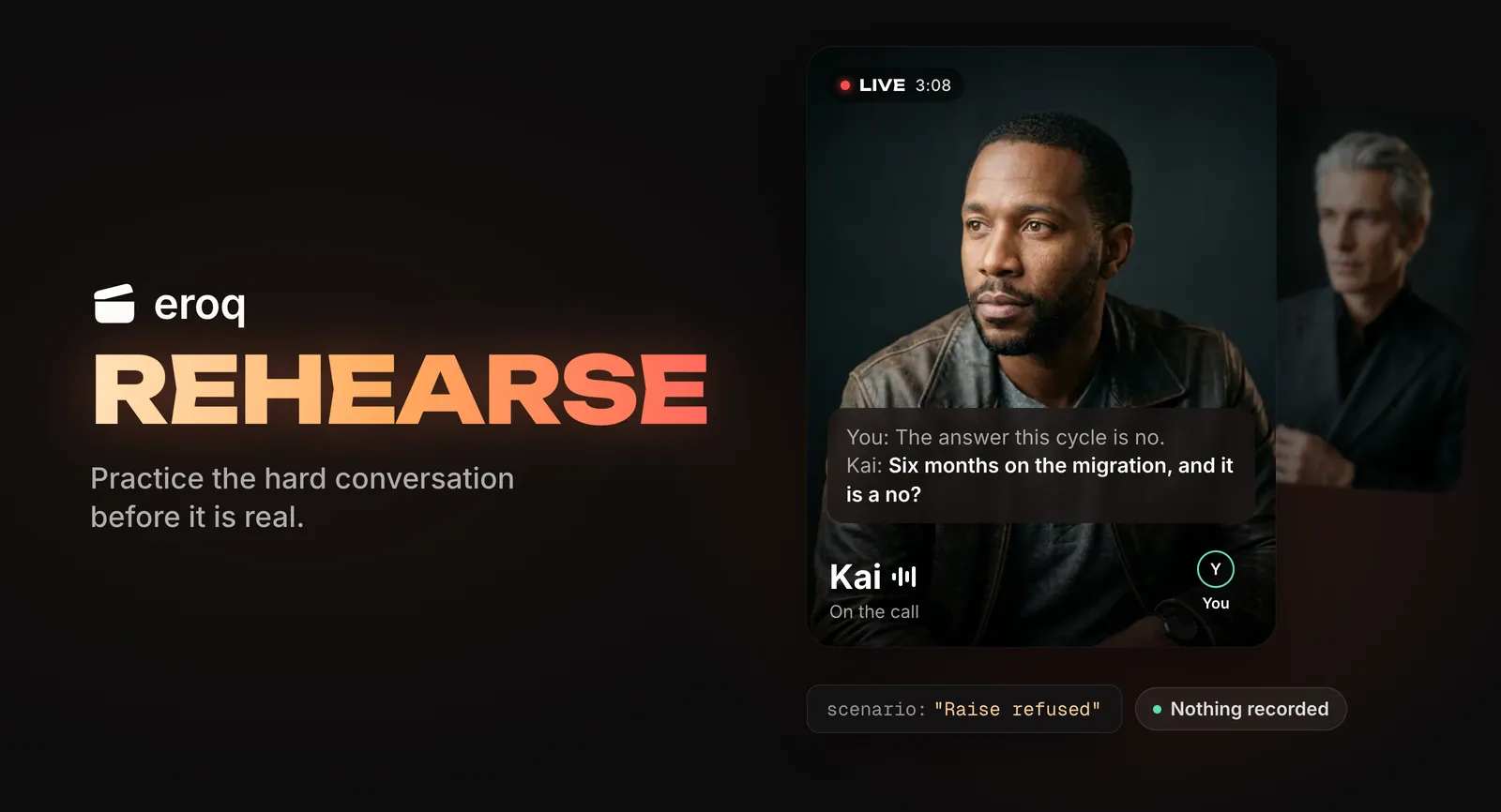
The best way to practice a difficult conversation is to say the hard sentence out loud, to someone who reacts like the real person, several times before the real meeting. An AI roleplay partner on a video call gives a manager exactly that, whenever they need it. A character with a face and a voice plays the employee on the defensive, each call opens on one situation (a refused raise, tough feedback, a layoff), and nothing is recorded.
With the eroq API, an HR, L&D or people-tools team can build this into its own product. Create the employee once, start each practice call with a scenario, collect the captions, then let eroq's chat API write the debrief. The whole architecture is in the HR guide to AI roleplay training.
Why rehearse out loud, with a face
Reading a script is not rehearsal. A hard conversation goes wrong in the second minute: the silence after the no, the "who decided that?", the hint that they might leave. You only learn to hold that moment by living it, and most managers get a handful of real chances a year.
In a 2025 Virginia Tech study, 17 managers tried an AI roleplay tool for workplace conversations. They valued low-risk practice on scenarios from their own work, and saw the AI as a complement to human coaching, not a replacement. Packaged products exist: Synthesia's Roleplay Sessions, for instance, sells learner seats and scores each attempt against a skills rubric. This guide is for teams that want their own tool, with their scenarios, their look and their data.
What you build
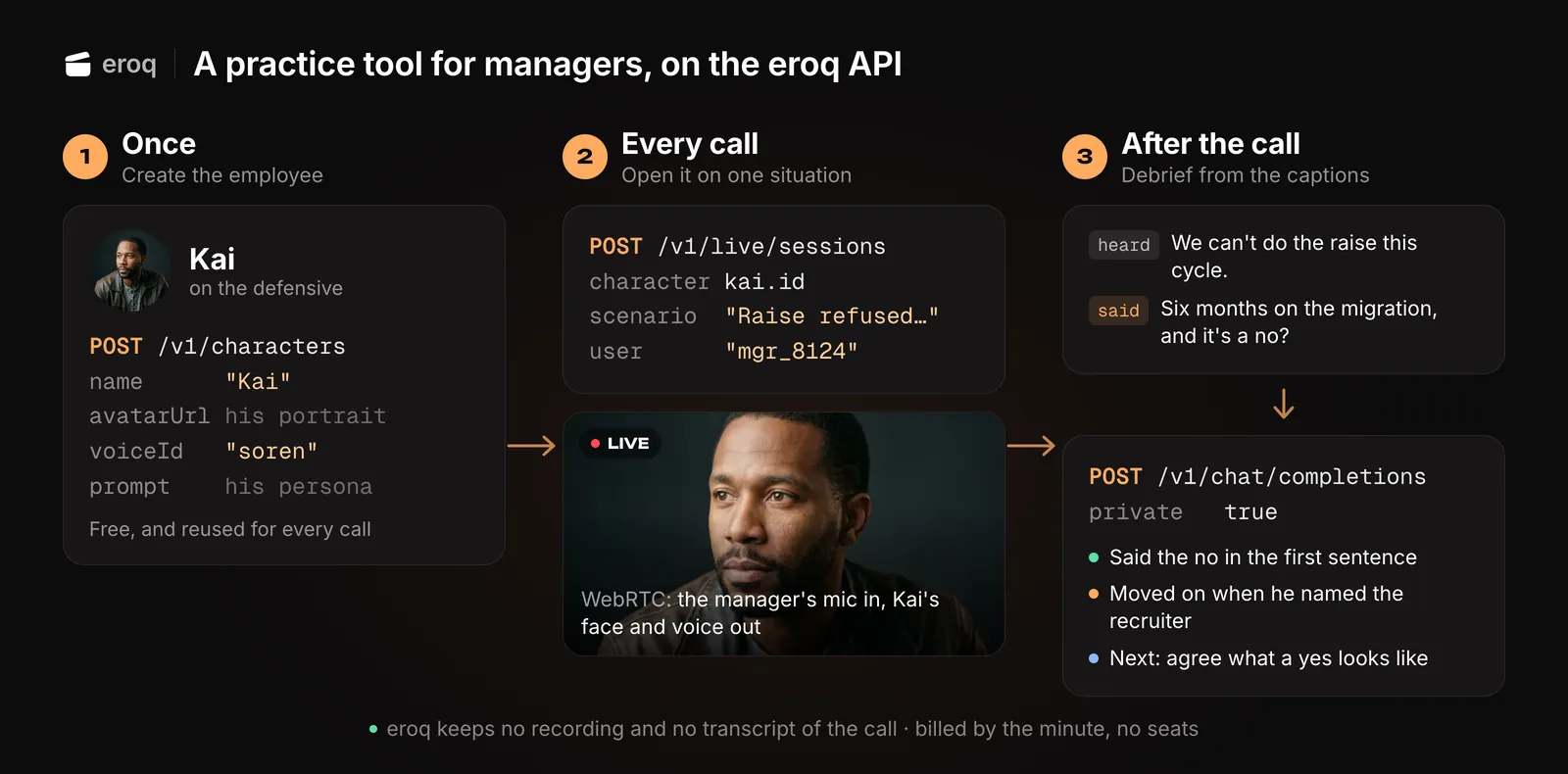
- Once: the employee.
POST /v1/characterswith a portrait, a voice and a persona that says who they are and how they react under pressure. Creating a character is free. - Every practice: one call, one situation.
POST /v1/live/sessionswith the character, ascenariofor this call, anduser, an opaque id for the manager. The character opens on the situation and keeps to it, and the character itself is not changed. - During the call: the captions. On a data channel named
eroq, your page receives what the manager said (heard) and each sentence the employee speaks (said). - After the call: the debrief. Your server sends the transcript to
POST /v1/chat/completionswith your coaching instructions, then shows the result to the manager.
One employee, three hard conversations
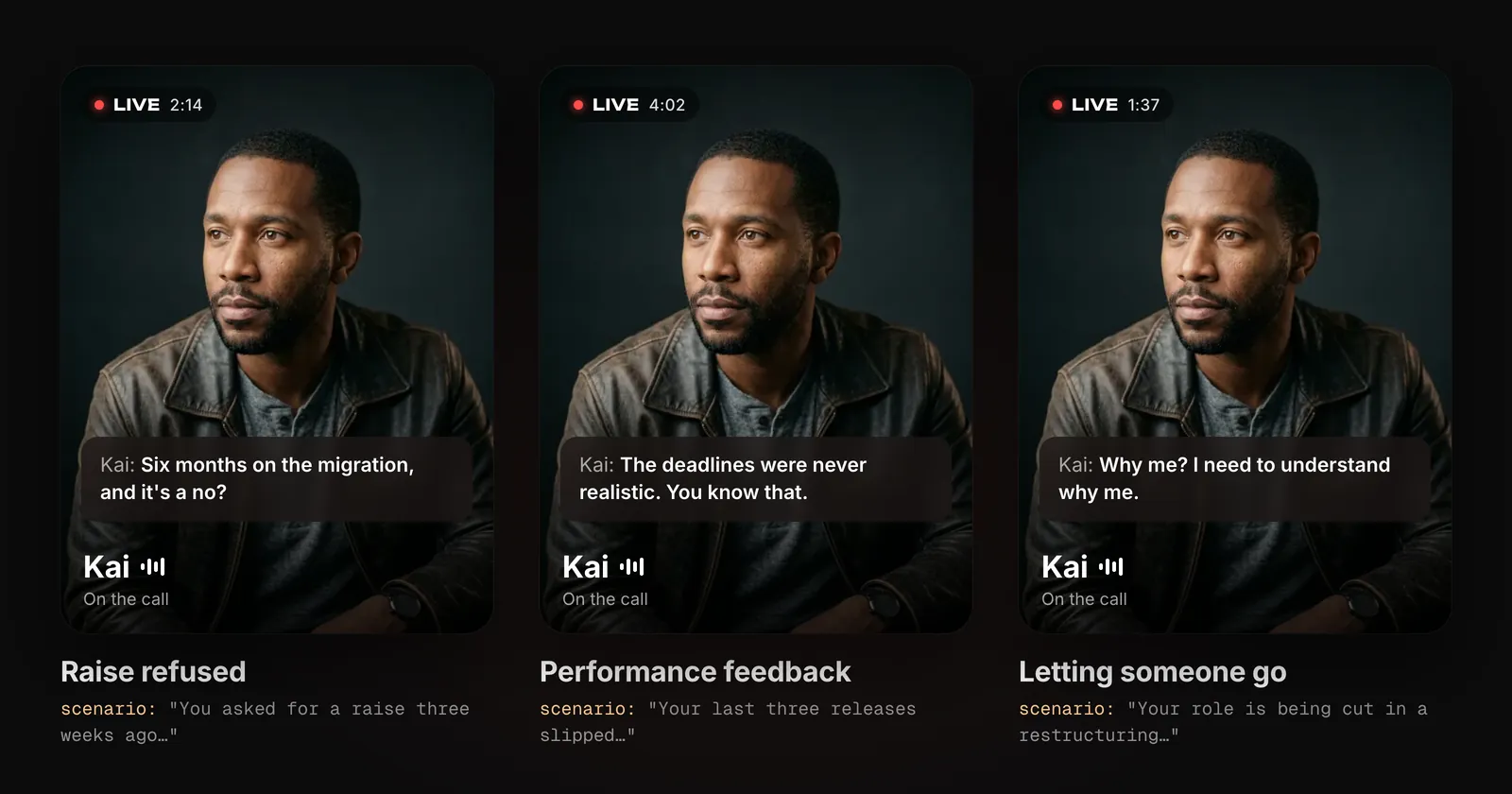
Make one character, Kai, a senior engineer who is good at his job and quick to feel judged. Then give each call its own scenario, written to Kai:
| Conversation | scenario |
What the manager practices |
|---|---|---|
| Raise refused | "You asked for a raise three weeks ago, after leading the migration. They are about to tell you it is a no this cycle. You expected a yes. Push back, and mention the recruiter who called you." | Saying no in the first sentence, staying with the reaction, naming what comes next |
| Performance feedback | "Your last three releases slipped and two teammates say you no longer answer in reviews. They are giving you this feedback today. You think the deadlines were unrealistic, and you blame the planning before you listen." | Facts instead of labels, asking before telling, agreeing on one change |
| Letting someone go | "Your role is being cut in a restructuring, effective at the end of the month. You did not see it coming. Go from silence to anger, ask why you, then ask about severance and references." | Being clear in the first minute, not arguing the decision, answering the practical questions |
A scenario holds up to 2,000 characters, so you can add what a real case would have: dates, numbers, what was promised.
The code
Your server creates the character once, then opens each call, with the fields of the Live calls API:
const eroq = (path, body) => fetch(`https://eroq.ai/v1${path}`, {
  method: 'POST',
  headers: { Authorization: `Bearer ${process.env.EROQ_API_KEY}`, 'Content-Type': 'application/json' },
  body: JSON.stringify(body),
}).then(res => res.json())

// Once
const kai = await eroq('/characters', {
  name: 'Kai', gender: 'male', age: 38, voiceId: 'soren',
  avatarUrl: 'https://your-cdn.example/kai.webp',
  prompt: 'Kai, senior engineer, eight years at the company. Proud of his work, quick to feel judged. Defensive first, then quiet; opens up only when he feels heard.',
})

// Every practice call
const call = await eroq('/live/sessions', {
  character: kai.id,
  scenario: RAISE_REFUSED, // one of the three above
  picture: 'creation:<id>', // optional: Kai in a meeting room
  user: 'mgr_8124',
})
picture is optional: a Library image (creation:<id>) or a Storage upload (upload:<id>) of Kai in a meeting room. The call frames his face in it and keeps the room around him, and falls back to his card portrait when no clear face looks at the camera.
call.ice_servers goes to the manager's browser, which opens the WebRTC connection. Your server relays the browser's offer to POST /v1/live/sessions/{id}/offer and polls GET /v1/live/sessions/{id} for the answer, so the API key never leaves your server. In the browser, open the captions channel before the offer:
const pc = new RTCPeerConnection({ iceServers: call.ice_servers })
const transcript = []
pc.createDataChannel('eroq').onmessage = ({ data }) => {
  const msg = JSON.parse(data)
  if (msg.type === 'eroq-live') transcript.push(`${msg.event === 'heard' ? 'Manager' : 'Kai'}: ${msg.text}`)
}
// then the microphone track, a video transceiver and the offer, as in /docs/live
Buy each next minute with POST /v1/live/sessions/{id}/extend, and hang up with POST /v1/live/sessions/{id}/end.
The debrief, from the transcript
eroq does not score the call. Your product does, from the transcript, with one request to eroq's chat API:
const review = await eroq('/chat/completions', {
  model: 'claude-fable-5-2',
  private: true,
  messages: [
    { role: 'system', content: 'You coach managers. From this practice call, write what worked, what to change, what they missed, and one sentence to try next time. Quote the transcript.' },
    { role: 'user', content: transcript.join('\n') },
  ],
})
// review.choices[0].message.content is the debrief
Here is what it gives on a short raise conversation:
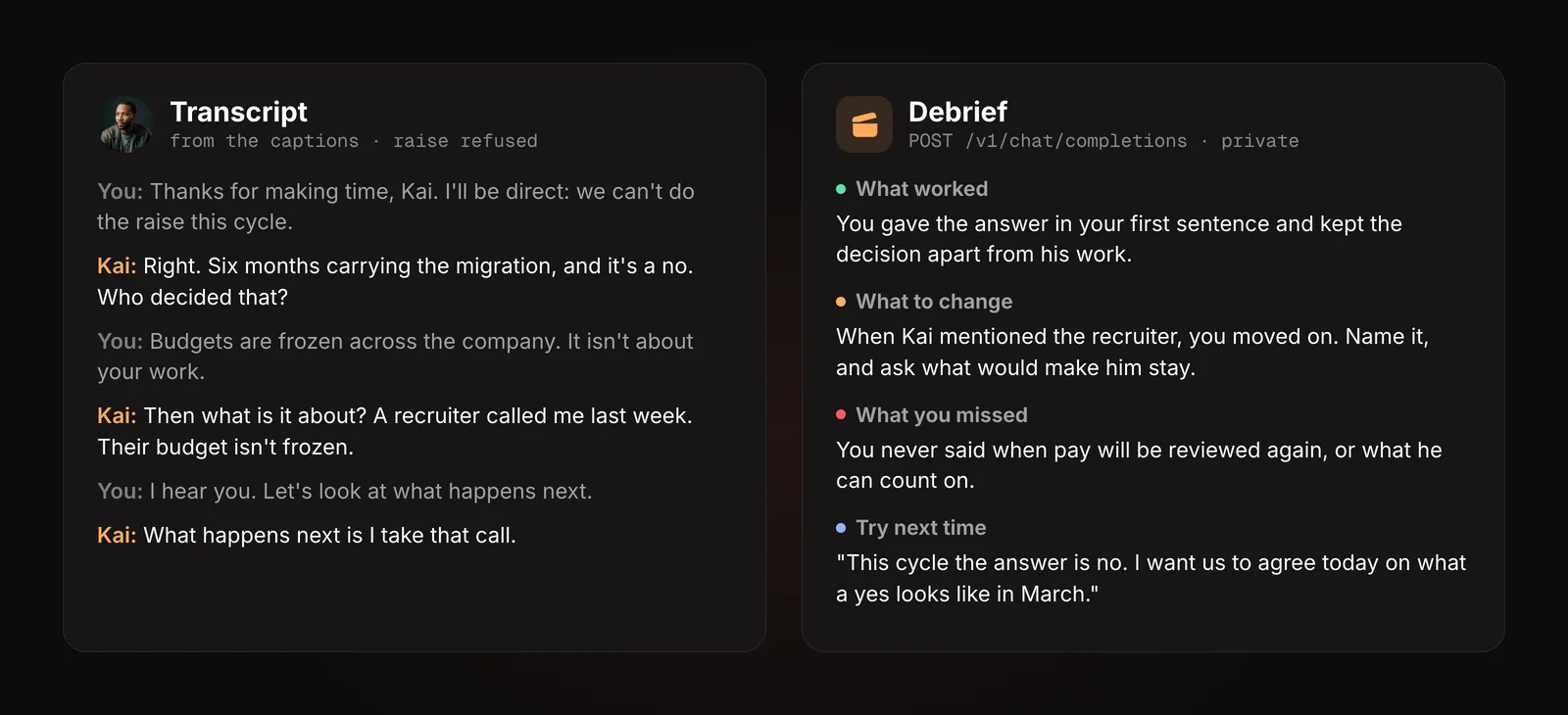
- What worked: you gave the answer in your first sentence and kept the decision apart from his work.
- What to change: when Kai mentioned the recruiter, you moved on. Name it, and ask what would make him stay.
- What you missed: you never said when pay will be reviewed again, or what he can count on.
- Try next time: "This cycle the answer is no. I want us to agree today on what a yes looks like in March."
The same request can return a score per skill if your program tracks progress. To make the next call harder, put the last debrief into the next scenario: "Last time they avoided the recruiter question. Bring it up early."
Nothing recorded
For HR topics, this is the argument that matters. eroq keeps no audio, no video and no transcript of a call: the captions go to your page and nowhere else. With private: true, the debrief request is not written anywhere on eroq's side either. The call's record holds what billing needs, its length, its credits and the user id you passed, so you can follow usage per manager. The transcript lives where you decide, or nowhere.
What it costs
A call costs 100 credits a minute, bought ahead a minute at a time, and a call that never connects gives its minute back. There are no seats: a manager who does not practice this month costs nothing. A 10-minute session plus its debrief comes to 1,020 credits, about $10.20 at the rate of the $10 Starter pack, and less on bigger packs.
What it does not do
- No built-in score or debrief. You build it from the captions, as above.
- No knowledge base. The persona holds 4,000 characters and the scenario 2,000: a person and a situation, not your HR handbook.
- No shared team library in the studio. In your product, every manager calls the characters your API key owns.
- Two open calls per workspace, and two hours at most per call. Plan group sessions around it.
- A reply takes a few seconds, and a cold start can take a minute or more to pick up. It feels like a call with a short delay, not a meeting in the room.
- Microphone only. The character does not see the manager, so body language is not part of the debrief.
Try it before you build it
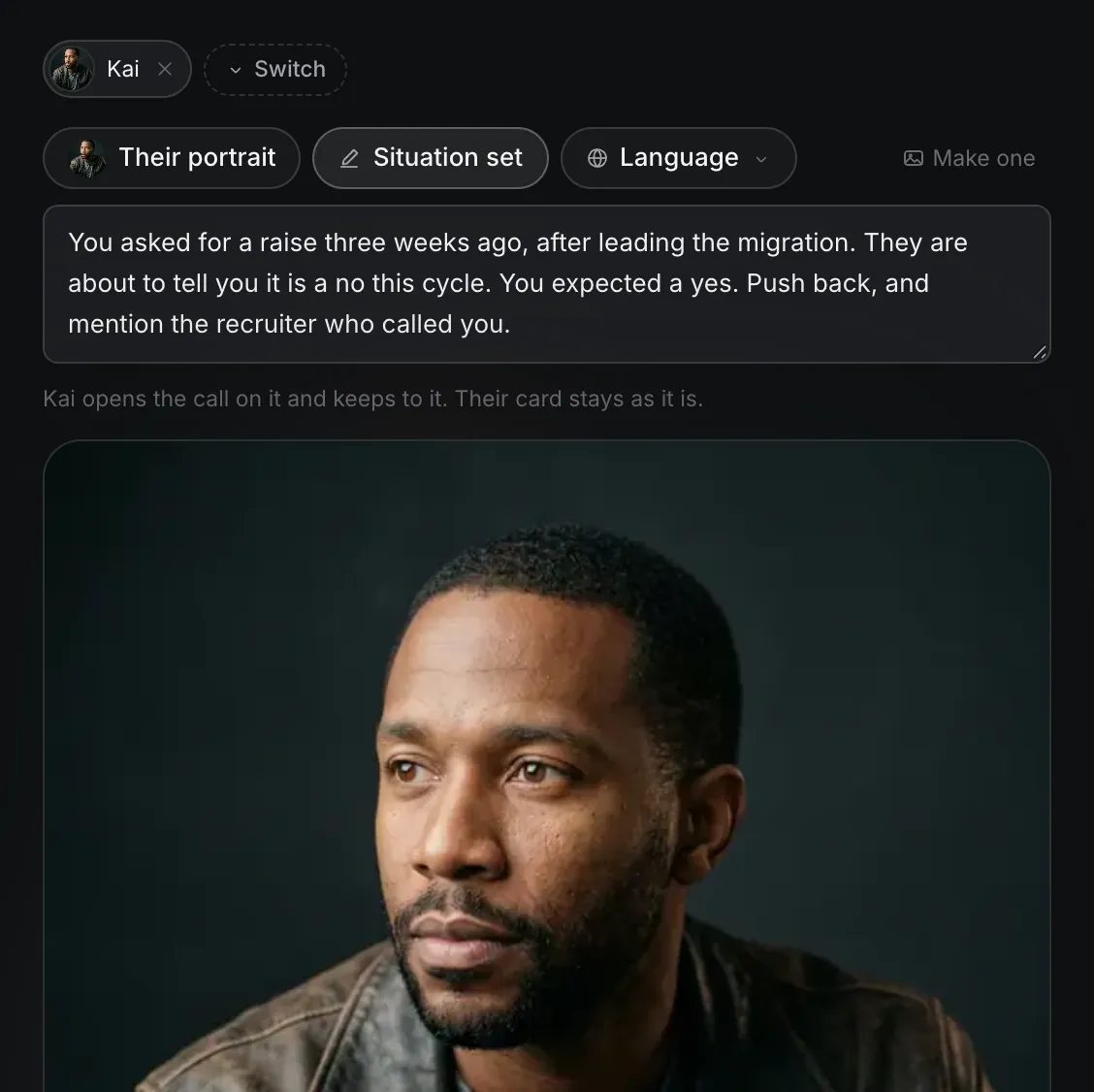
You can test the experience today in eroq Live, in the studio, with your own character. Pick them, then use the row under them: Situation takes the same text as scenario, Language holds the call to one language, and a picture can put them in a meeting room. These choices stay in your browser, and the character's card does not change. The help page walks you through a first call.
FAQ
Is the practice conversation recorded?
No. eroq keeps no audio, video or transcript of a Live call. The captions reach only your page, and what you store is up to you.
Can the AI give feedback after the conversation?
Not by itself. Your product collects the captions during the call and sends them to eroq's chat API with your coaching instructions, which returns a debrief or a score in one request.
How realistic is the AI employee?
The character answers in its own voice with a lip-synced face and keeps to the situation you set: it pushes back, deflects, goes quiet. Each reply takes a few seconds, like a call with a short lag.
What does one practice session cost?
100 credits a minute for the call, and 20 credits for a debrief written by Claude Fable 5.2. There are no seats and no subscription to the tool: you pay for the minutes used.
Do managers need an eroq account?
Not in a product built on the API: your server holds the key, and managers use your tool. To try the experience yourself in the studio, you need an account and credits.
Can managers practice in another language?
Yes. Pass language (a code such as es, or a name) and the character speaks it for the whole call. Without it, the character answers in the language of the manager's last sentence.
More: AI roleplay training, the HR guide · eroq Live, video call your characters · AI video call · Live calls API.

Dreh es in Video
Alles oben passiert im Studio: dieselben Engines, dieselben Einstellungen, gerendert auf deinen Klick.
40 Gratis-Credits · keine Kreditkarte · Privatmodus für jedes Konto
Probier diesen Prompt
Tracking shot alongside a skateboarder bombing down a steep San Francisco street at golden hour, low angle, motion blur
Privatsphäre
Privat und uneingeschränkt
- Kein Filter auf den eigenen Engines von eroq: stattdessen eine schriftliche Richtlinie.
- Sie behalten nichts, und nichts wird mit deiner Arbeit trainiert.
- Der Privatmodus speichert keine einzige Datei.