





13 ott, 01:39:36·Pronto · Ci sono voluti 31 sec · −10 crediti
@Immagine 1: sostituisci l’uomo con la donna di @Immagine 2, stessa giacca, stesso vicolo, stesso neon
Eroq One · Mantieni · 1 ripresa

Tool
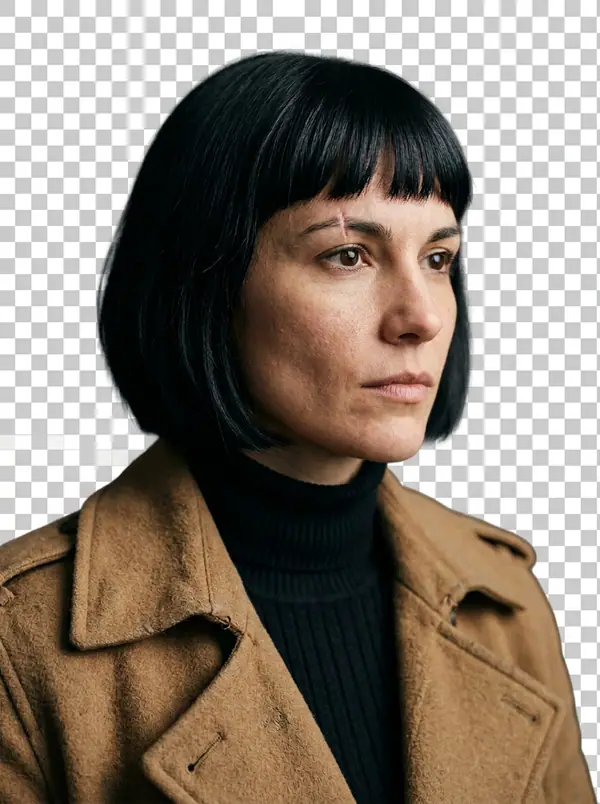
eroq removes a picture's background in one click: open Image › Remove background, add the picture, and eroq Cutout gives it back as a transparent PNG at its own size, the subject's edges and hair kept. It costs 5 credits a picture on eroq's own GPUs, and Video › Edit does the same for clips.
40 crediti gratis · nessuna carta · modalità privata su ogni account
Immagine · Crea
13 ott, 01:39:36·Pronto · Ci sono voluti 31 sec · −10 crediti
@Immagine 1: sostituisci l’uomo con la donna di @Immagine 2, stessa giacca, stesso vicolo, stesso neon
Eroq One · Mantieni · 1 ripresa
13 ott, 01:42:07·Pronto · Ci sono voluti 26 sec · −40 crediti
@Lena, ritratti spontanei in 35mm a casa, calda luce dalla finestra, leggera grana da pellicola
Eroq One · 3:4 · 4 riprese




@Lena, ritratti spontanei in 35mm a casa, calda luce dalla finestra, leggera grana da pellicola
Video › Edit › Remove background keeps the person of a clip, every frame, with its sound: 2 credits a second, up to 30 seconds.
Clap · agente IA
Descrivi il risultato in Ask. Clap ti chiede ciò che gli serve, sceglie i motori, scrive i prompt e calcola il costo del piano. Appena approvi, renderizza tutto nella tua libreria. Tutto automatico, e non parte nulla prima del tuo sì.
Ask · Clap
Clap · Ha pensato per 6s
Tre immagini, lo stesso volto della scheda di Lena. Ecco il piano.
Produzione



Salvato nella tua libreria
Ogni riquadro apre la sua tendenza nello studio, pronta da usare.
Privacy
Privato e senza restrizioni
Open Image › Remove background, add the picture and press Remove background. You get the subject on a transparent background, as a PNG at the picture's own size.
Yes: the PNG keeps the subject and nothing else, ready to lay on any color, picture or page.
Yes: add the cutout to Image › Edit and describe the scene ("on a marble countertop, soft window light"). The editor draws the new background around your subject.
Yes, in Video › Edit › Remove background: eroq Cutout keeps the person on every frame, on a transparent background or a green screen, at 2 credits a second of clip.
Free to start: every new account gets 40 free credits with no card, 8 cutouts at 5 credits each. A cutout that fails refunds itself. More credits start with a $10 pack (1,000 credits) or a plan from $15/month.
Yes: POST /v1/images/remove-background with a file or one of your media keys returns the transparent PNG, at the same price.
40 crediti gratis · nessuna carta · modalità privata su ogni account
Continua a esplorare