blog/developers·25 nov 2026·10 min·por el equipo de eroq
Add a video-call character to your app with the eroq Live API (WebRTC, step by step)
Build an AI video call into your app with the eroq Live API. Create a character, open a call with a scenario and a language, connect the browser over WebRTC, keep the captions, buy each minute as you go, then score the call with the chat API. Exact code.
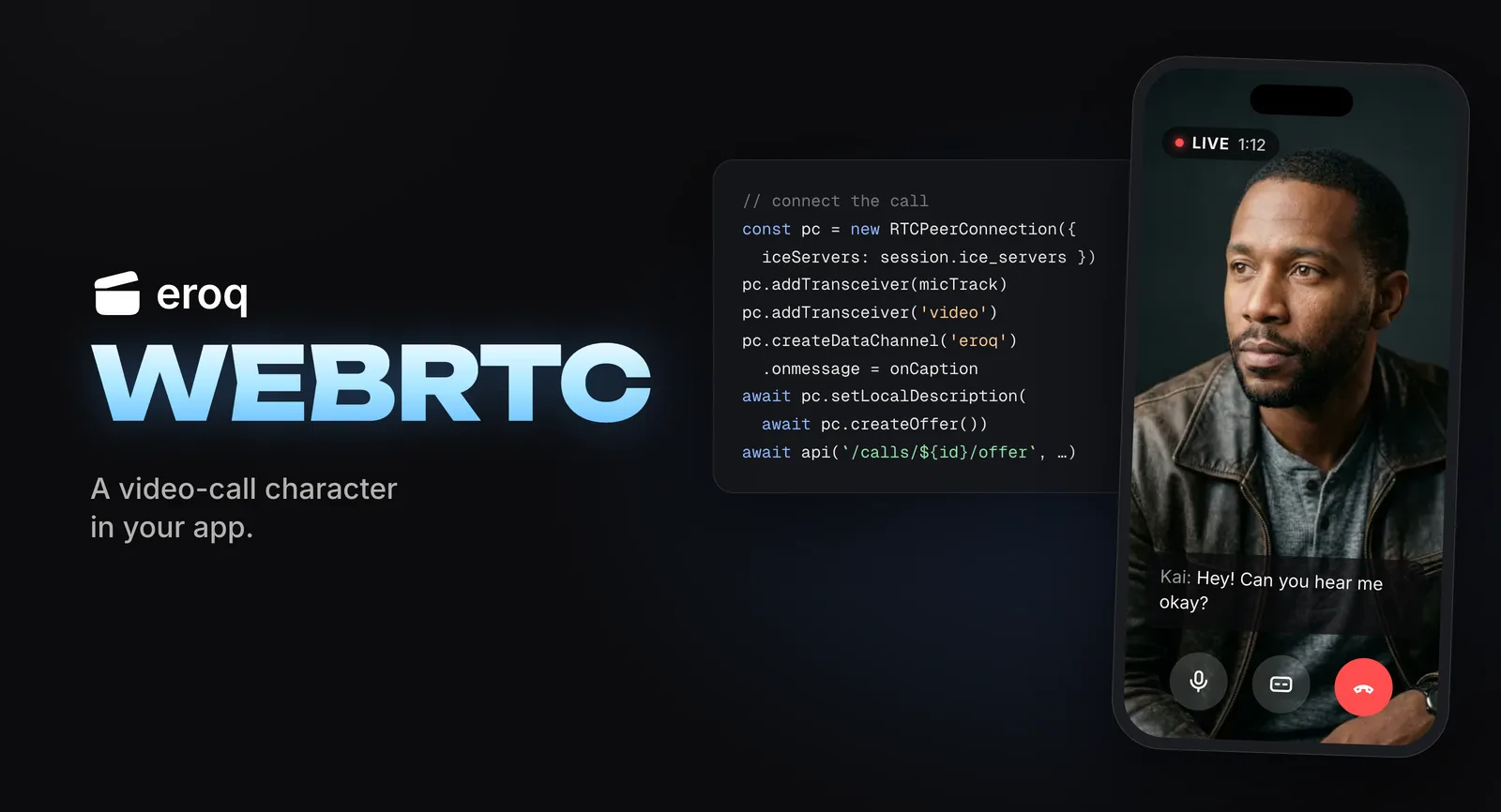
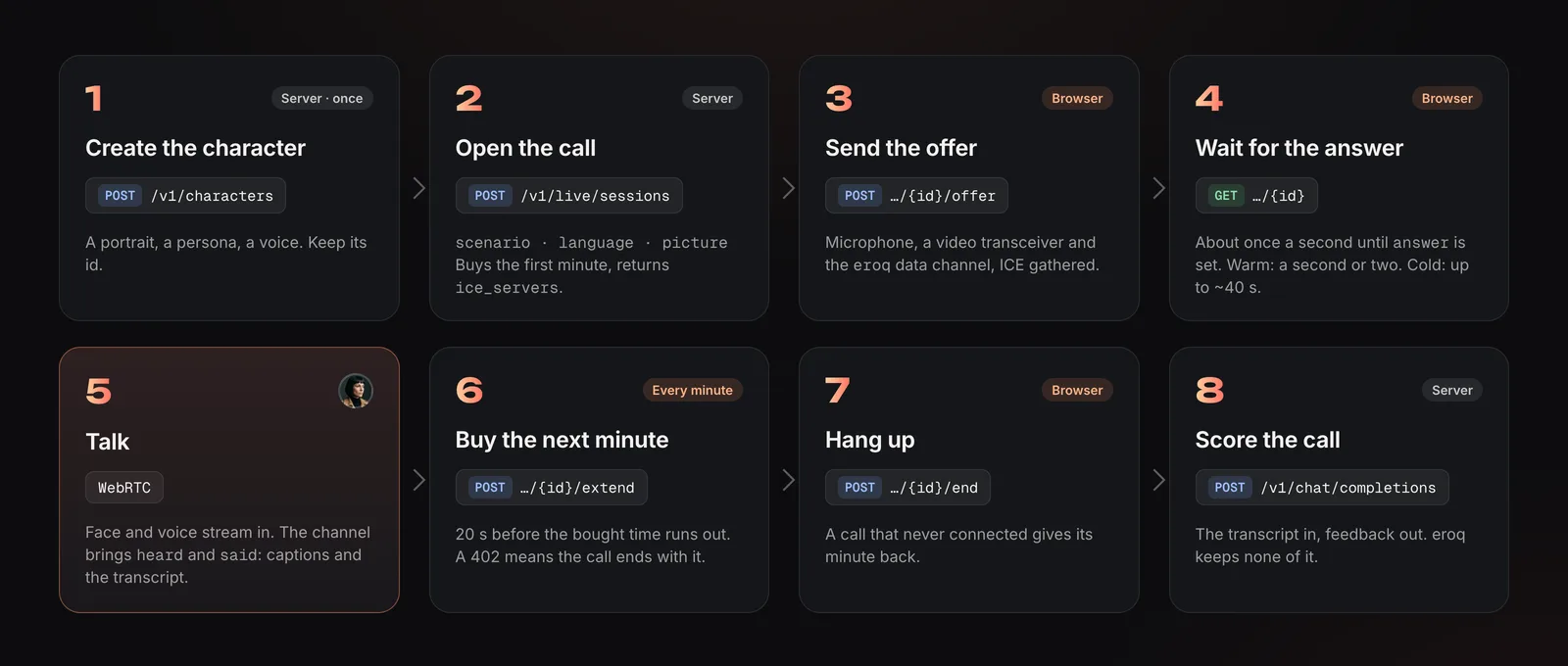
To add a video-call character to your app with eroq, create the character once (POST /v1/characters with a portrait, a persona and a voice). Then open a call with POST /v1/live/sessions, optionally with a scenario and a language. Connect the browser over WebRTC with the ICE servers it returns, send the offer, poll until the answer arrives, and buy the next minute with /extend while the call runs. Hang up with /end. Your server keeps the API key; the browser only does WebRTC. A call costs 100 credits a minute.
This tutorial builds an interview-practice call with a recruiter named Mara, then turns the captions into feedback after the call. Every field below comes from the Live calls reference. Comparing providers first? Read Best real-time AI avatar APIs in 2026.
What you need
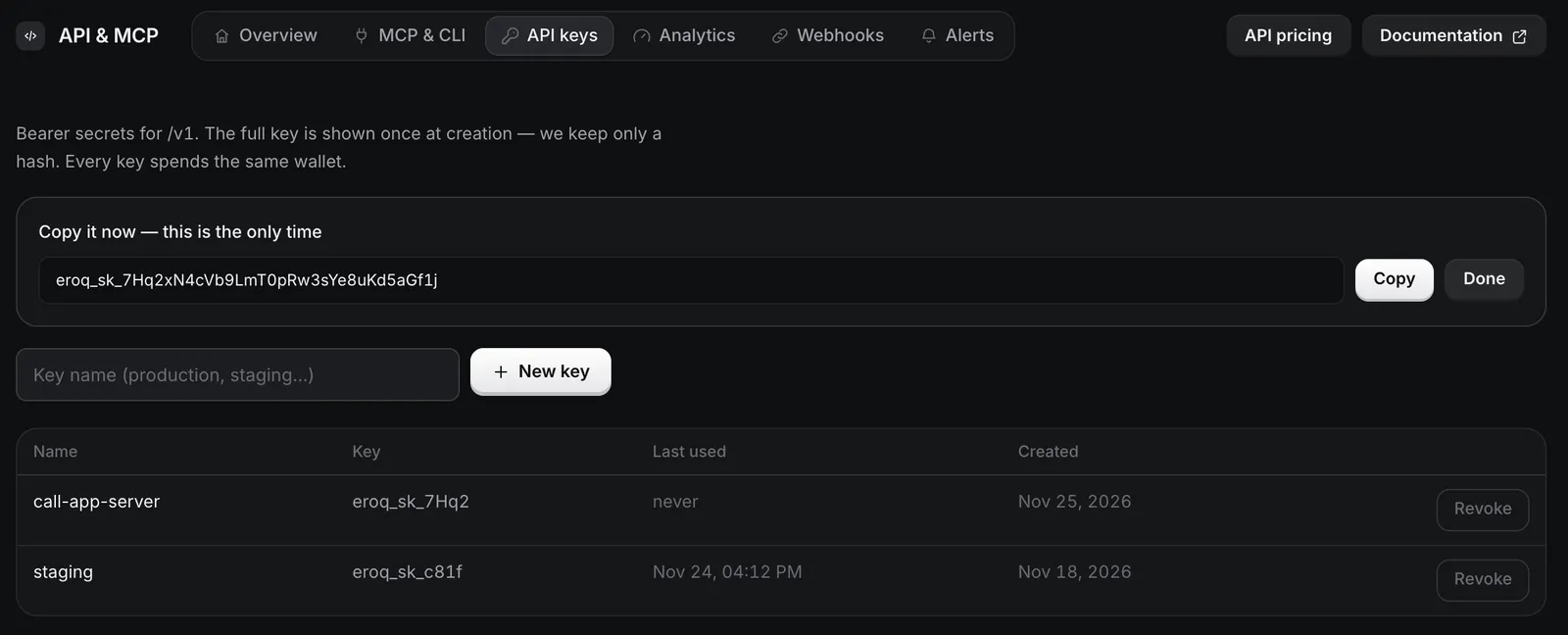
- An API key. Create one in API & MCP › API keys. It stays on your server.
- Credits. New accounts start free with 40 credits; a minute of call is 100.
- A portrait. A hosted https image of a clear, front-facing face. The face of the call is made from it.
- Node 18 or later for the server code, and a browser with WebRTC and a microphone.
1. Create the character, once
A character is a persona, a portrait and a voice. Create it from your server and keep its id:
const HEADERS = {
  Authorization: `Bearer ${process.env.EROQ_API_KEY}`,
  'Content-Type': 'application/json',
}

const mara = await fetch('https://eroq.ai/v1/characters', {
  method: 'POST',
  headers: HEADERS,
  body: JSON.stringify({
    name: 'Mara',
    gender: 'female',
    age: 41,
    prompt: 'Mara is a senior recruiter at a mid-size tech company. Warm but direct, she asks one short question at a time and asks for a concrete example when an answer is vague.',
    avatarUrl: 'https://cdn.example.com/mara.jpg',
    voiceId: 'aria',
  }),
}).then(response => response.json())

console.log(mara.id) // keep it, e.g. in MARA_ID
prompt is the persona, read up to 4,000 characters on a call. voiceId is a library voice (GET /v1/voices lists them) or the id of a voice you cloned with POST /v1/voices, which is free. A character made in the studio works the same way: GET /v1/characters gives its id. To write a persona that holds a spoken conversation, see How to write a character persona that holds a live call.
2. A thin relay on your server
Every Live call needs your key, so the browser talks to your server and your server talks to eroq. The drills are chosen on the server, so a page can never send its own scenario:
// server.js (Node 18+, Express)
import express from 'express'

const app = express()
app.use(express.json({ limit: '200kb' }))

const LIVE = 'https://eroq.ai/v1/live/sessions'
const DRILLS = {
  designer: { scenario: 'You are interviewing them for a junior product designer role: ask about one past project, push back once on a vague answer.', language: 'en', picture: process.env.MARA_OFFICE }, // creation:<id>
  'designer-es': { scenario: 'You are interviewing them for a junior product designer role at a company in Madrid: ask about one past project, push back once on a vague answer.', language: 'es' },
}
const calls = new Map() // call id → your user id

const eroq = (path, body) => fetch(LIVE + path, {
  method: body === undefined ? 'GET' : 'POST',
  headers: HEADERS,
  body: body === undefined ? undefined : JSON.stringify(body),
})
const relay = async (res, response) => res.status(response.status).json(await response.json())
const owns = req => calls.get(req.params.id) === req.user.id // req.user: set by your own auth middleware

app.post('/calls', async (req, res) => {
  const drill = DRILLS[req.body.drill]
  if (!drill) return res.sendStatus(400)
  const response = await eroq('', { character: process.env.MARA_ID, user: req.user.id, ...drill })
  const call = await response.json()
  if (response.ok) calls.set(call.id, req.user.id)
  res.status(response.status).json(call)
})
app.post('/calls/:id/offer', async (req, res) => owns(req) ? relay(res, await eroq(`/${req.params.id}/offer`, { type: 'offer', sdp: req.body.sdp })) : res.sendStatus(404))
app.get('/calls/:id', async (req, res) => owns(req) ? relay(res, await eroq(`/${req.params.id}`)) : res.sendStatus(404))
app.post('/calls/:id/extend', async (req, res) => owns(req) ? relay(res, await eroq(`/${req.params.id}/extend`, { minutes: 1 })) : res.sendStatus(404))
app.post('/calls/:id/end', async (req, res) => owns(req) ? relay(res, await eroq(`/${req.params.id}/end`, {})) : res.sendStatus(404))

app.listen(3000)
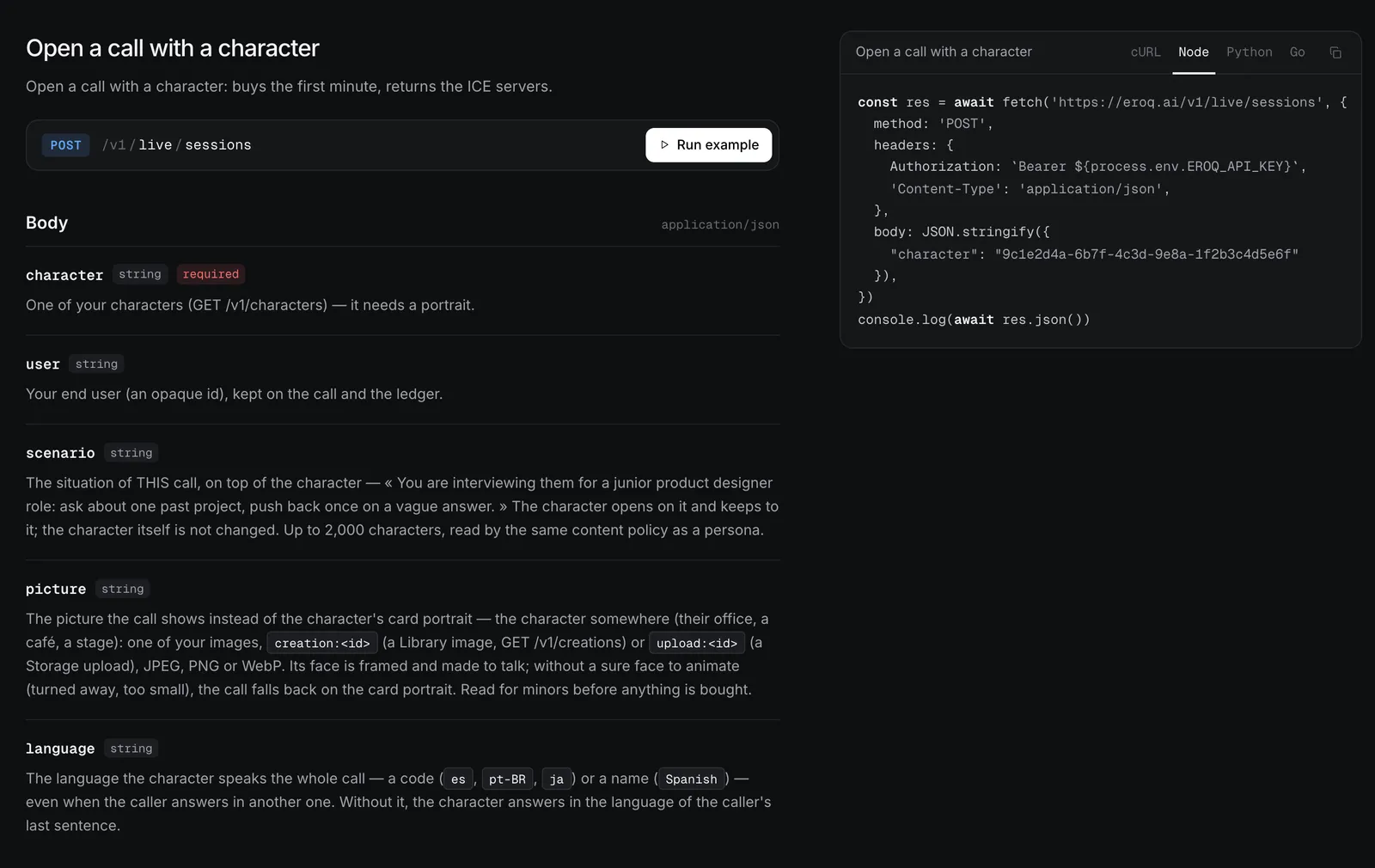
POST /v1/live/sessions buys the first minute and answers 201 with the call's id, its ice_servers and paid_seconds. user is your own id for the person calling, kept on the call and the ledger. scenario is the situation of this call (up to 2,000 characters), and language is a code or a name the character speaks the whole call, even if the caller switches. picture is optional: one of your images of the character somewhere (creation:<id> from your Library or upload:<id> from Storage), Mara at her desk here. The call frames her face in it and keeps the background, and falls back to the card portrait when no clear, camera-facing face is found.
3. Connect the browser
The page needs a <video id="face" playsinline>, a <p id="caption"> and two buttons, #call and #hangup. The call starts from the click on #call: the click is what lets the voice play.
const video = document.querySelector('#face')
const transcript = []
let call = null

const api = (path, body) => fetch(path, {
  method: body === undefined ? 'GET' : 'POST',
  headers: { 'Content-Type': 'application/json' },
  body: body === undefined ? undefined : JSON.stringify(body),
}).then(async (response) => {
  const data = await response.json()
  if (!response.ok) throw Object.assign(new Error(data.error?.message ?? 'Call failed'), { status: response.status })
  return data
})

async function startCall(drill) {
  const remote = new MediaStream()
  video.srcObject = remote
  video.play().catch(() => {}) // before any await

  const mic = await navigator.mediaDevices.getUserMedia({
    audio: { echoCancellation: true, noiseSuppression: true, autoGainControl: true },
  })
  const session = await api('/calls', { drill })

  const pc = new RTCPeerConnection({ iceServers: session.ice_servers })
  pc.addTransceiver(mic.getAudioTracks()[0], { direction: 'sendrecv' })
  pc.addTransceiver('video', { direction: 'sendrecv' }) // the face comes back on it
  pc.createDataChannel('eroq').onmessage = onCaption // before the offer
  pc.ontrack = (event) => {
    remote.addTrack(event.track)
    video.play().catch(() => {})
  }
  call = { id: session.id, pc, mic, paid: session.paid_seconds, connectedAt: 0, ticks: 0 }
  pc.onconnectionstatechange = onConnection

  await pc.setLocalDescription(await pc.createOffer())
  await new Promise((resolve) => { // ICE gathered, 3 s at most
    if (pc.iceGatheringState === 'complete') return resolve()
    pc.onicegatheringstatechange = () => pc.iceGatheringState === 'complete' && resolve()
    setTimeout(resolve, 3000)
  })
  await api(`/calls/${session.id}/offer`, { sdp: pc.localDescription.sdp })
  await pc.setRemoteDescription(await waitForAnswer(session.id))
}

async function waitForAnswer(id) {
  const started = Date.now()
  while (Date.now() - started < 165_000) {
    await new Promise(resolve => setTimeout(resolve, 1000))
    const state = await api(`/calls/${id}`).catch(() => null) // a blip: ask again
    if (state?.answer) return state.answer
    if (state && ['failed', 'ended'].includes(state.status)) throw new Error(state.end_reason ?? 'failed')
  }
  throw new Error('no_answer')
}
A warm call picks up in about ten seconds. A cold one starts a call machine first and can take a minute or more, so show a ringing state. A call nobody picks up within 150 seconds fails and gives its minute back.
4. Keep the captions
The eroq channel carries JSON: heard once the caller's words are transcribed, said for each sentence the character speaks. eroq keeps none of it, so this array is the only transcript:
function onCaption(event) {
  let message
  try { message = JSON.parse(event.data) } catch { return }
  if (message.type !== 'eroq-live' || typeof message.text !== 'string') return
  transcript.push({ speaker: message.event === 'heard' ? 'caller' : 'character', text: message.text.trim() })
  if (message.event === 'said') document.querySelector('#caption').textContent = message.text
}
5. Buy each minute, then hang up
Time is bought ahead. Once connected, buy the next minute 20 seconds before the bought time runs out, and read the call now and then: the call ends a few seconds after paid_seconds if nothing more was bought.
function onConnection() {
  if (call?.pc.connectionState === 'connected' && !call.connectedAt) {
    call.connectedAt = Date.now()
    call.timer = setInterval(tick, 1000)
  }
  if (call?.pc.connectionState === 'failed') hangUp()
}

async function tick() {
  const current = call
  if (!current) return
  const elapsed = (Date.now() - current.connectedAt) / 1000
  if (!current.buying && !current.outOfCredits && current.paid - elapsed <= 20) {
    current.buying = true
    try {
      current.paid = (await api(`/calls/${current.id}/extend`, {})).paid_seconds
    }
    catch (error) {
      if (error.status === 402) current.outOfCredits = true // the call ends with the bought time
    }
    current.buying = false
  }
  if (++current.ticks % 5 === 0) {
    const state = await api(`/calls/${current.id}`).catch(() => null)
    if (state && ['ended', 'failed'].includes(state.status)) hangUp()
  }
}

async function hangUp() {
  if (!call) return
  const { id, pc, mic, timer } = call
  call = null
  clearInterval(timer)
  pc.close()
  mic.getTracks().forEach(track => track.stop())
  await api(`/calls/${id}/end`, {}).catch(() => {})
  if (transcript.length) showFeedback(await api(`/calls/${id}/feedback`, { transcript: transcript.splice(0) })) // showFeedback: your UI
}

document.querySelector('#call').onclick = () => startCall('designer').catch(hangUp)
document.querySelector('#hangup').onclick = hangUp

window.addEventListener('pagehide', () => call && navigator.sendBeacon(`/calls/${call.id}/end`))
A call that never connected gives its first minute back when it ends.
6. Score the call with the chat API
There is no built-in score: your product decides what good looks like. Send the transcript to POST /v1/chat/completions from your server. With no system turn, Claude Fable 5.2 answers as an assistant, at 20 credits a reply. private: true keeps the conversation off eroq's side:
app.post('/calls/:id/feedback', async (req, res) => {
  if (!owns(req)) return res.sendStatus(404)
  const lines = req.body.transcript
    .map(line => `${line.speaker === 'caller' ? 'Candidate' : 'Interviewer'}: ${line.text}`)
    .join('\n')
    .slice(-15000) // the model reads 16,000 characters at most
  const response = await fetch('https://eroq.ai/v1/chat/completions', {
    method: 'POST',
    headers: HEADERS,
    body: JSON.stringify({
      model: 'claude-fable-5-2',
      private: true,
      user: req.user.id,
      messages: [{
        role: 'user',
        content: `Transcript of a mock interview for a junior product designer role:\n\n${lines}\n\nGive the candidate three strengths, three things to work on, and a score out of 10 for structure and for clarity. Quote their own words.`,
      }],
    }),
  })
  const data = await response.json()
  res.json({ feedback: data.choices?.[0]?.message?.content ?? '' })
})
Anthropic's usage policy applies to Claude Fable 5.2. For a call that went into dark fiction, use eroq-rp-plus (3 credits) with your grading rules in a system turn.
What it costs per user
A ten-minute drill is 1,000 credits for the call plus 20 for the feedback: 1,020 credits, about $10.20 on the Starter pack. A minute costs $1.00 on Starter and $0.83 on the $100 Scale pack. There is no seat fee and no monthly plan, and a call that never connects is free.
Errors worth handling
| Status | Code | What it means |
|---|---|---|
| 402 | insufficient_credits |
On open: top up first. On extend: the call ends when the bought time runs out. |
| 400 | character_without_face |
Give the character a portrait: PATCH /v1/characters/{id} with avatarUrl. |
| 400 | picture_not_found, content_blocked |
The picture is not a JPEG, PNG or WebP image in your account, or someone in it may be under 18. Nothing was charged. |
| 429 | too_many_calls |
A workspace holds two open calls: end one first. |
| 503 | live_busy |
No one could pick up: retry in a minute. The minute was given back. |
| 409 | call_over, call_too_long |
The call has ended, or reached its two-hour limit. |
FAQ
Can the browser call eroq directly?
Not with your key: every Live endpoint needs it, and a key in a page is public. Relay the five calls through your server, as above. The media itself goes straight between the browser and the call.
Which characters can my app call?
Characters on your own account, with a portrait. Create them by API or in the studio. Each one is 18 or older, and its persona follows the acceptable-use policy.
How do I get a transcript of the call?
From the eroq data channel: heard for the caller, said for the character. eroq keeps no audio, video or captions, so keep the lines you need in your own app.
Can one character run different drills?
Yes. Pass a different scenario on each call, and a language to hold the call in one language. The character itself does not change.
How long can a call last?
Up to two hours, as long as each minute is bought before the last one runs out.
Try a call first in the studio at eroq Live. More: eroq Live, the launch · Real-time AI avatar · Credit pricing for AI APIs.
Hazlo en eroq
Constrúyelo sobre la API
Una clave de API se obtiene en un minuto. Los mismos motores, los mismos precios, trabajos asíncronos y webhooks.
40 créditos gratis · sin tarjeta · modo privado en todas las cuentas
Privacidad
Privado y sin restricciones
- Sin filtros en los motores propios de eroq: una política escrita en su lugar.
- No conservan nada y nada se entrena con tu trabajo.
- El modo privado no guarda ningún archivo.