Generate an image
2 menit baca
Singkatnya
The Create tab: prompt, Style, model, format, takes, negative prompt, the Enhance button and the feed your renders land in.
Di halaman ini
Open Image → Create and describe the picture. @mention a character, an element or a recent render to bring it into the prompt; Add character and Add context elements, above the box, open the same list.
In Settings, pick a model card (each one shows its price and what it is good at) and a format (1:1, 3:4, 4:3, 9:16 or 16:9).
Choose 1 to 4 takes with the − and + under the prompt. The button shows the total; click Generate. An empty box is not an error to hunt for: the button puts the cursor in it and says "Describe the picture first."
Each Generate adds a row to the feed under the composer, newest on top, with its takes developing in place. Hover a take to Animate, Edit, Download or delete it; click it to open it in the viewer. "Clear this temporary feed" empties the page; the renders stay in History and the Library.
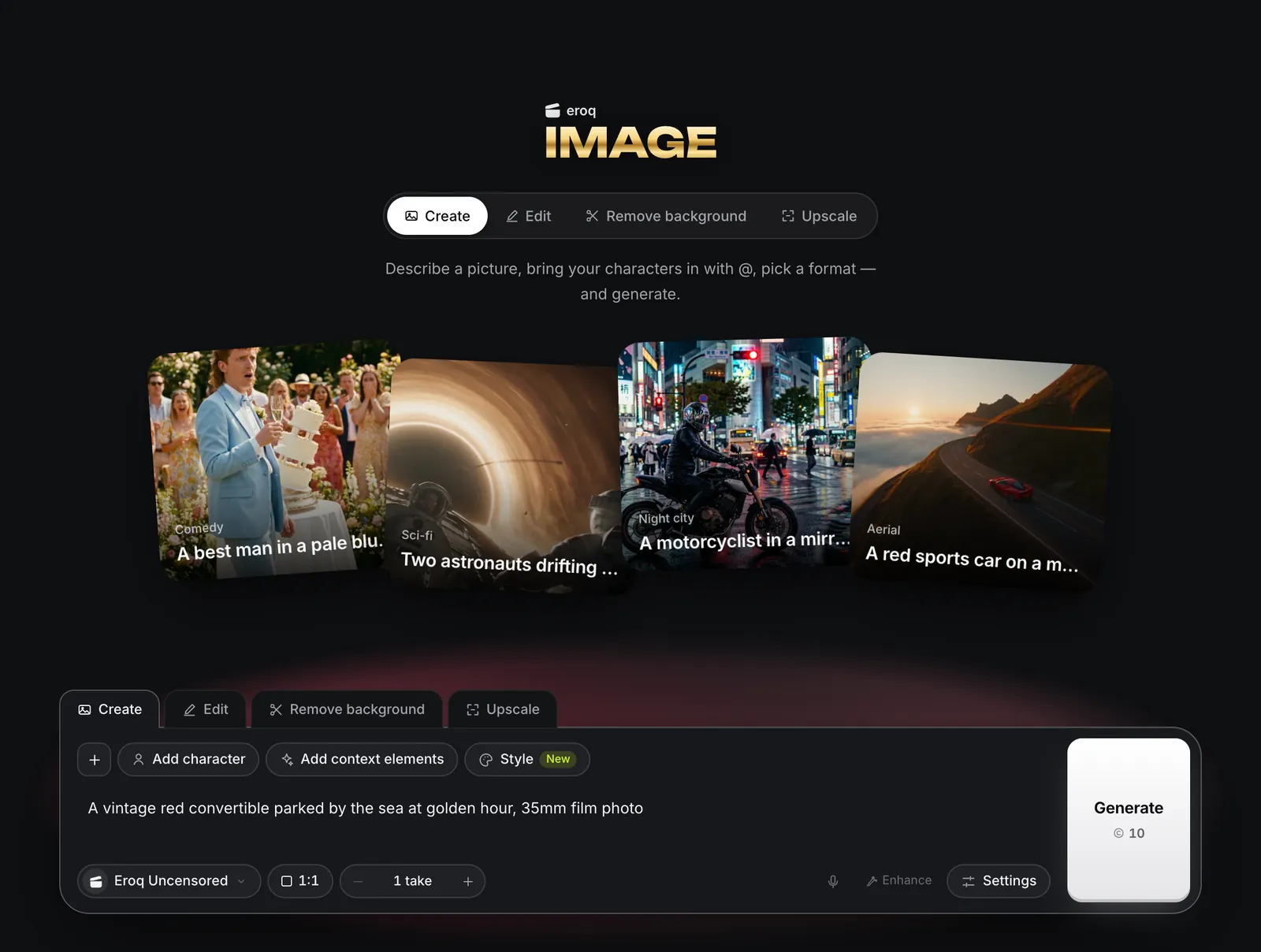
The controls
Negative prompt (on the models that read one): what to keep out of the picture. It is never checked against the content policy, so "child" there is the right way to exclude one.
Prompt strength: how literally the model follows your words, from Loose to Strict. Move it only when a render ignores you (raise) or looks stiff (lower).
Enhance: no credits. On an empty box it invents a prompt on every account; rewriting your draft as a fuller description needs a paid plan. Mentions survive the rewrite.
Save to: the Library folder new renders go to, shared by every tool.
Style, beside Add character: six looks (iPhone photo, Photorealistic, Anime, 35mm film, Cinematic, Flash editorial). A pick writes its words at the end of your prompt, where you can edit them; another pick swaps them, and "Remove the style" takes them out. There are no image templates any more: example prompts rotate in the empty box instead.
Text and logos
Diffusion models mangle lettering and eroq has no text layer. Leave room for the type and add it in a design tool, or use the Photoshop or Figma plugin and keep the whole workflow in one place.
Apakah ini menjawab pertanyaanmu?
Terkait
Masih buntu?
Ceritakan apa yang terjadi dan seseorang membalas dalam satu hari kerja, atau tulis ke hello@eroq.ai