Your first render
1 phút đọc
Tóm lại
From the studio home to a finished image, clip or voice line — and what happens to it afterwards.
Trong trang này
The studio home is Ask: type what you want and Clap answers, opens the right tool with your words and settings in place, or proposes the renders with their price for you to approve. A tool chip under the bar hands your words straight to that tool. Nothing renders without your click.
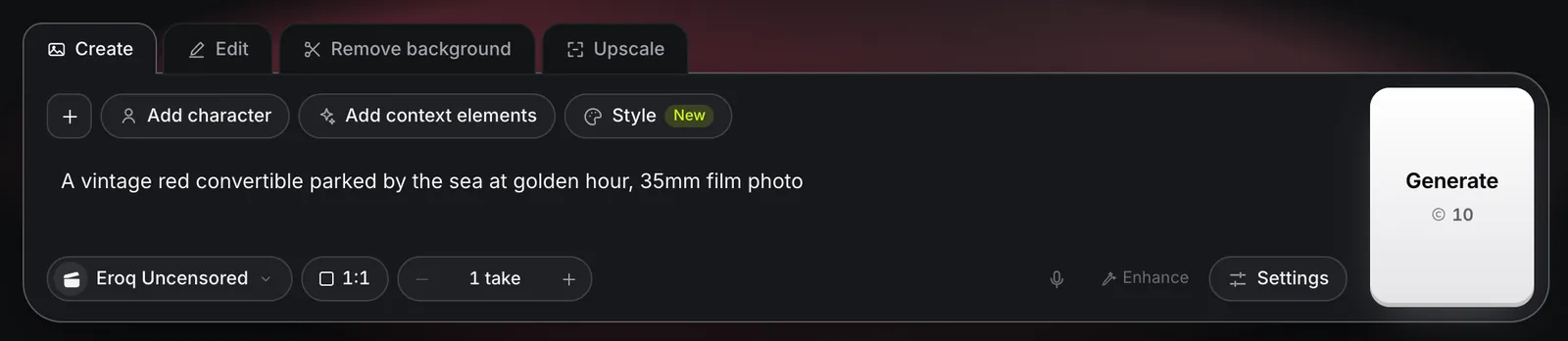
In the tool, the Generate button shows the exact price before you click it ("Generate · 10 cr"). The side panel holds Settings (engine, format, resolution, sound), History and Ask; the length and the takes sit under the prompt, and a price changes the moment a setting does.
Click Generate. Each Generate adds a row to the feed under the composer, where the takes develop in place: images and voice lines come back in seconds; video renders run in the background and the queue in the top bar tracks them, so you can leave the page.
Where it goes
Every render is saved to your Library automatically and at no cost, with its full recipe (prompt, engine, settings) so you can restore it later. Nothing you make is public unless you publish it yourself.
If you are short on credits
The studio warns you before the click, not after: the button says what the render needs and what you have, and a line under the composer lists cheaper versions (one take instead of four, a shorter clip, an image instead) and the pack or plan that covers it. Nothing is charged for a render that cannot start.
Câu trả lời này có giải đáp được thắc mắc của bạn không?
Liên quan
Vẫn bị kẹt?
Hãy cho chúng tôi biết chuyện gì đã xảy ra và một người sẽ trả lời trong một ngày làm việc, hoặc viết cho hello@eroq.ai