Edit and export
1 phút đọc
Tóm lại
The Edit tab is the Editor with your film on it: trims, transitions, titles, subtitles, sound, then one MP4 exported in your browser.
The Edit tab is the Editor's timeline with the film loaded: the main track holds the take in the cut of each shot, snapped end to end, and every tool of the Editor works here (trims, transitions, music and sounds, titles, looks, keyframes, overlays, cuts on the beat). The dialogue of your shots becomes subtitles in one click, one per line.
Media
The bin lists the film's shots, your Creations and your Uploads, under Media, Audio and Titles. Audio uploads (mp3, wav, m4a, aac, ogg, opus, flac) and video or image files go to a Cinema folder in Storage.
Export
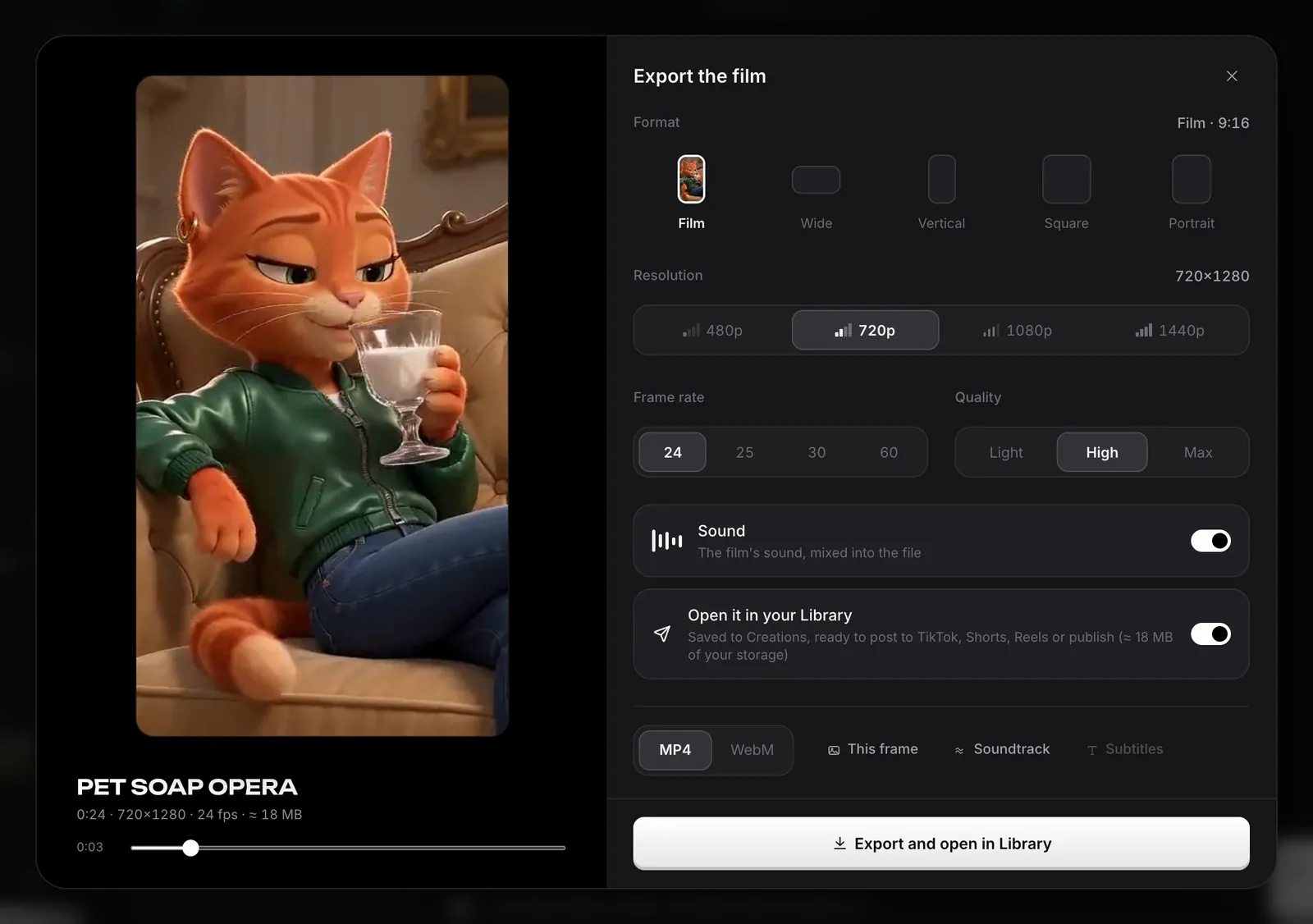
Export, in the film's header (or Download under the board), opens the export window: the film's frame on the left, reframed live as you pick a format, with a scrubber; on the right the format (Film, its own frame, or Wide 16:9, Vertical 9:16, Square 1:1, Portrait 4:5), the resolution (480p, 720p, 1080p and 1440p), the frame rate (24, 25, 30 and 60 fps), the quality (Light, High or Max) and the sound, on or silent. The cut renders inside your browser, with no credits and no server queue: keep the tab open. An MP4 is saved as the film's cut (up to 95 MB; the bitrate adapts to stay under) and opens in your Library, to post to TikTok, Shorts or Reels, publish or download; a WebM is a download only. The same window gives the frame under the playhead (PNG), the soundtrack (WAV) and the subtitles (.srt).
Câu trả lời này có giải đáp được thắc mắc của bạn không?
Liên quan
Vẫn bị kẹt?
Hãy cho chúng tôi biết chuyện gì đã xảy ra và một người sẽ trả lời trong một ngày làm việc, hoặc viết cho hello@eroq.ai