
blog/guides·11 nov. 2026·13 min·par l’équipe eroq
Best Venice AI alternatives for images and video — 8 tools compared
A Venice AI alternative for images, video or chat? Eight tools compared on privacy, content policy, video, characters and price, as of November 2026.
A good Venice AI alternative is eroq if you want uncensored images and video, characters that keep the same face, and your cast put into clips you already have with the original sound kept; NanoGPT if you want Venice's kind of pay-as-you-go chat across many models, with your history on your device; and ComfyUI on your own computer if privacy matters most. Venice itself is still a private, chat-first assistant with images, video and music paid in credits: as of November 2026, Pro is $18 a month and includes 100 credits a month, worth $1, for those.
People who look for an alternative usually want what Venice does not put at the center (a studio rather than a chat window, a recurring cast across pictures and clips), or they are weighing its October 2026 credit changes, covered in what changed at Venice and what to use instead. This list is for both.
We make eroq, so it is on this list; everything said about the others is from their own public pages as of November 2026 — check their site before you decide.
Quick picks
| Tool | Best for | Pricing (as of November 2026) | Policy / privacy note |
|---|---|---|---|
| eroq | Uncensored images and video, recurring characters, your cast in existing clips | 40 free credits; packs from $10, plans from $15 a month | Uncensored on its own engines within a written policy; Private mode |
| NanoGPT | Pay-as-you-go chat across many models | Pay as you go from $1 by card; PRO $12 a month | Chat history kept on your device |
| Mage | Unlimited images, its own video models, character swaps | Free to start; Basic about $10, Pro about $30 a month | Private by default; "creative freedom within clear boundaries" |
| NovelAI | Anime art and story writing | Subscriptions from $10 a month; Anlas on demand | Prompts encrypted; images not stored on its servers |
| Proton Lumo | A private assistant that also draws | Free with limited images; Lumo Plus $9.99 a month billed yearly | Zero-access encryption; never trains on your chats |
| Perchance | Free, quick images with no account | Free | Generators built by its community; rules vary by page |
| ComfyUI (local) | Maximum privacy on your own GPU | Free software; you supply the hardware | Runs fully offline |
| Leonardo | A polished studio when you do not need uncensored | Free 150 tokens a day; Essential $12 a month | Filtered by default; free creations are public |
1. eroq — best for uncensored images and video, characters and your cast in existing clips
eroq is an AI studio and an API for video, images, voice, music and roleplay chat, on credits. It shares Venice's stance — private, and uncensored within a written policy — and builds a studio on it instead of a chat.
What it is best at. Uncensored images and video on eroq's own engines, which render the prompt as written within the policy. For images, Eroq Uncensored makes photoreal scenes with in-place editing and up to four reference pictures, Eroq One generates and edits in plain words from up to ten reference pictures, and Anima draws anime and stylized illustration. For video, eroq Motion One renders 5 to 15 seconds with native sound from a prompt, a photo or a clip whose motion it copies, on every account; named engines (Seedance, Kling, Veo, Hailuo, Runway, Wan, Grok) sit next to it, 16 in all, each priced per second. Any image can become the first frame of a clip in one click (uncensored image generator). A Character carries an identity sheet, a persona and a voice, and you @mention it in any tool, so the same face holds across stills, clips, voices and chat (AI character creator). eroq Replace Pro puts up to four of your characters into a clip you already have, an upload, one of your renders or a TikTok link, and keeps the moves, the camera, the lip movement and the original sound; Every shot recasts a whole TikTok, up to a minute, cut on its own cuts. Roleplay chat on eroq RP+ and RP mini, voice cloning and songs on eroq Music One share the wallet.
Policy and privacy. eroq's own engines are uncensored within a written policy: fiction only; nothing involving minors, no real identifiable people without consent, nothing illegal. A request outside it is refused before any credit is spent. Private mode, in Image, Video, Voice and Text, keeps no file and no library entry and replaces the prompt with stars in the usage ledger; the engines eroq runs itself keep nothing upstream, and eroq never trains on your prompts, references or creations.
Where it falls short. Uncensored covers eroq's own engines only: Seedance, Kling, Veo and the other third-party engines stay moderated by their providers, which may log requests on their side (each model card says so), and most of them need a plan. One Replace Pro render covers 2 to 10 seconds, so longer clips go shot by shot, and Cinema and Replace do not run in Private mode. It has a chat, but its center is making things, not a daily assistant.
Pricing. 40 welcome credits, no card. A 5-second eroq Motion One clip is 145 credits, an image on Eroq Uncensored 10 credits / image, a Replace Pro swap 30 credits / second in 768p, and a reply on eroq RP mini 1 credit / completion. Failed renders refund themselves, credits never expire, and cancelling a plan does not remove the credits you have. Packs start at $10 and plans at $15 a month, by card or crypto; the grid is on /pricing. Who runs it and how you pay: is eroq legit?. Side by side: eroq vs Venice.
2. NanoGPT — best for pay-as-you-go chat across many models
NanoGPT puts more than a thousand AI models in one place, ChatGPT, Claude and Gemini among them, for chat, writing, code, images and video. It says it keeps your chat history on your device, and your first chat is free, with no account. If what you use Venice for is private chat on many models, it is the closest match here.
What it is best at. Choice without a subscription: you top up a balance and pay for what you use, from $1 by card or $0.10 in crypto. Developers get an OpenAI-compatible API, and Silly Nano is its app for characters and stories.
Where it falls short. It is built around chat; its pages describe no recurring cast across pictures and clips, no clip recasting and no film tools. On content, its pricing page lists uncensored text models, GLM 5.3 Uncensored among them, as billed from your balance; read its terms for its rules.
Pricing (as of November 2026). Pay as you go, or PRO at $12 a month: 60 million input tokens a week on open-source text models and 100 images a day on four image models. Video, voice and most closed models bill from your balance.
3. Mage — best for unlimited images, its own video models and swaps
Mage calls itself an "unlimited AI image and video generator", free to start and private by default. It now runs models of its own, Mango for images and Cherry 2 Pro for video "with characters and their voices", next to open and named models such as Wan 3.0, Seedance and Nano Banana 2.
What it is best at. Volume and character work. Memberships add unlimited generation on select models; one reference image keeps a character consistent across images and videos; Motion Control applies a reference video's movement to your character; and its video apps recast a clip with your characters or swap a face or a whole character into a video. Commercial use is allowed on every plan, and an API, an MCP server and SDKs run the same models, paid per generation in Gems.
Policy and privacy. "Everything you make stays private until you choose to post it or share it elsewhere." On content, Mage "supports creative freedom within clear boundaries" and bans illegal and prohibited material; its terms give the detail.
Where it falls short. Many models and settings to learn. Membership Gems expire after 30 days and purchased Gems 90 days after purchase, and plans are billed in euros.
Pricing (as of November 2026). Free to start, no card. Basic is about $10 a month (unlimited on base models, 500 Gems), Pro about $30 (adds unlimited video generation, 1,500 Gems), Pro Plus about $60 and Max about $200.
4. NovelAI — best for anime art and story writing
NovelAI pairs an anime image generator, now on NovelAI Diffusion V5 ("sharper details, more characters, full comic pages"), with a story writer "built to write with you, not for you". Character consistency is built in, and Director Tools change details, clothing, lighting and poses.
What it is best at. Illustrated characters and long fiction from one subscription. Privacy is part of the pitch: NovelAI says your prompts are encrypted and generated images are never stored on its servers unless you save them.
Where it falls short. It specializes in anime styles, its pages list no video, and it is not a free generator: a trial, then a subscription.
Pricing (as of November 2026). Subscriptions start at $10 a month for image and text, or Anlas, its on-demand currency, if you would rather not subscribe.
5. Proton Lumo — best for a private assistant that also draws
Lumo is Proton's AI assistant. If what you value in Venice is the privacy of your chats, it is a close match: Proton protects them with zero-access encryption and says Lumo never uses them to train AI. It also generates images.
Where it falls short. It is an assistant first: image generations are limited on the free plan, with more on Plus, and its pages list no video. Its pitch is privacy rather than a content policy, so check its terms for what it will draw.
Pricing (as of November 2026). Free, no card, with limited image generations; Lumo Plus is $9.99 a month billed yearly ($119.88), with more of everything.
6. Perchance — best for free, quick images with no account
Perchance is a site where people build and share generators. Its main AI image generator is free and needs no account, the quickest way to try an idea.
Where it falls short. Generators are made by its community, so features and rules change from one page to the next: read the terms on the page you use. For video, a recurring cast across tools or an API, look elsewhere on this list.
Pricing. Free.
7. ComfyUI on your own computer — best for maximum privacy
ComfyUI describes itself as "the most powerful and modular diffusion model GUI, api and backend with a graph/nodes interface". It runs fully offline, its core downloads nothing unless you ask, and it supports NVIDIA, AMD, Intel and Apple Silicon GPUs. You build node graphs around image, video and audio models you download yourself.
Where it falls short. The cost moves to hardware and time: a capable GPU, installs, workflows to assemble. Optional paid API nodes and Comfy Cloud send work off your machine, so leave them off if privacy is the point. Each model has its own licence, and the law applies on your computer as it does online.
Pricing. Free and open source (GPL-3.0), at github.com/Comfy-Org/ComfyUI. The full trade-off is in self-hosting vs an uncensored AI API.
8. Leonardo — best when you do not need uncensored
Leonardo is here for contrast: a polished creator platform for images, video and design, filtered by default, in the web app and in its API. If you leave Venice for better image tools and your work fits a general-audience filter, it is worth a look; if you leave for the policy, it is not the one.
Where it falls short. For a Venice user, the filter, and privacy on the free plan: free creations are public, and private generations come with paid plans.
Pricing (as of November 2026). A free plan with 150 tokens a day; Essential at $12 a month. The side-by-side is at eroq vs Leonardo.
How to choose
- Start from what you make most. Daily private chat: stay on Venice, or try NanoGPT or Lumo. Anime illustration and stories: NovelAI. Clips with a recurring cast, voices and a film cut: eroq. Quick free tests: Perchance.
- Putting your character into a clip you have? Since October 2026, Venice has a video recast model that swaps up to four people from one photo each; its page says the result has no audio track, so you re-sync the sound yourself. eroq Replace Pro casts saved characters from their identity sheets and keeps the original sound and lip movement. Mage has character and face swap apps.
- Ask who moderates. "Uncensored" usually covers a platform's own models only; engines from other providers keep their providers' rules. Look for a written policy, and for whether refusals are charged.
- Ask what is kept. Prompts, files and history, and where they live. A mode that keeps no file, or a model on your own machine, beats a promise.
- Price what you actually make, and what you could lose. Per-second video credits, unlimited memberships and flat subscriptions behave differently. Venice Pro includes $1 of credits a month, and banked Venice credits go when you downgrade or cancel; Mage's Gems expire; eroq's credits never do.
- Think about automation early. eroq has a REST API (docs), an MCP server and a CLI; Venice, NanoGPT and Mage have APIs too. Developers: the best uncensored AI API goes deeper.
- Count your hardware. A strong GPU and a few free evenings make ComfyUI the most private option.
FAQ
What is a good alternative to Venice AI?
It depends on what you use Venice for. For video, characters and recasting clips you already have, eroq; for pay-as-you-go chat across many models, NanoGPT; for a private assistant, Proton Lumo; for anime art and stories, NovelAI; for the most privacy, ComfyUI on your own computer.
Is there an uncensored AI like Venice with video?
Yes. eroq Motion One is eroq's own video engine, uncensored within a written policy (fiction only; nothing involving minors, no real identifiable people without consent, nothing illegal), with native sound and no plan required: 145 credits for 5 seconds. Venice offers video on named third-party engines paid in credits, some of them tagged uncensored.
What is the best Venice AI alternative for images and video?
eroq, if you want both in one studio with the same character in every still and clip: its own uncensored image and video engines, named engines such as Seedance, Kling and Veo, and eroq Replace Pro for clips you already have. Mage is the pick for unlimited image volume on a membership.
Is Venice AI free?
Partly. A free Venice account gets 10 text prompts and 15 image prompts a day on base models, and since October 2026 logged-out visitors get 8 chat messages a day. Video, music and premium models are paid in credits; Pro is $18 a month with 100 credits, worth $1, included.
Can I put my own character into an existing video?
On eroq, eroq Replace Pro recasts up to four people in a clip with your saved characters and keeps the moves, cuts, lip movement and original sound (AI character swap). Venice added a video recast model in October 2026 that works from one photo per person and returns the clip without sound. Mage has character and face swap apps.
Which Venice alternative is the most private?
ComfyUI on your own computer, with its optional cloud features off: nothing leaves it. Among hosted tools, Lumo encrypts your chats, NanoGPT keeps your history on your device, NovelAI encrypts prompts and keeps images off its servers, and eroq's Private mode keeps no file and no library entry and replaces the prompt with stars in the usage ledger.
Which Venice alternatives are uncensored?
eroq's own engines are, within its written policy. Its third-party engines are moderated upstream by their providers. NanoGPT lists uncensored text models, Mage describes "creative freedom within clear boundaries", a model you run in ComfyUI follows its licence and the law, and Leonardo is filtered by default.
Is there a free Venice AI alternative?
Perchance's image generator is free with no account. NanoGPT's first chat is free with no account, Mage and Lumo start free, eroq gives 40 welcome credits with no card, and ComfyUI is free if you already own the GPU.
Can I keep the same character across images and video?
On eroq, yes: a Character carries an identity sheet, a persona and a voice into every tool, and you @mention it by name. Mage keeps a character consistent from one reference image across its images and videos, and NovelAI keeps characters consistent across anime scenes. Venice's custom characters are made for chat.
Does Venice have an API, and which alternatives do?
Venice has an OpenAI-compatible API and an MCP server. Among the alternatives, eroq has a REST API, an MCP server and a CLI, NanoGPT an OpenAI-compatible API, and Mage an API, an MCP server and SDKs.
Want the head-to-head? eroq vs Venice puts both side by side, criterion by criterion.
Tourne-le dans Vidéo
Tout ce qui précède se passe dans le studio : mêmes moteurs, mêmes réglages, rendu à ton clic.
40 crédits offerts · sans carte · mode privé sur chaque compte
Essayer ce prompt
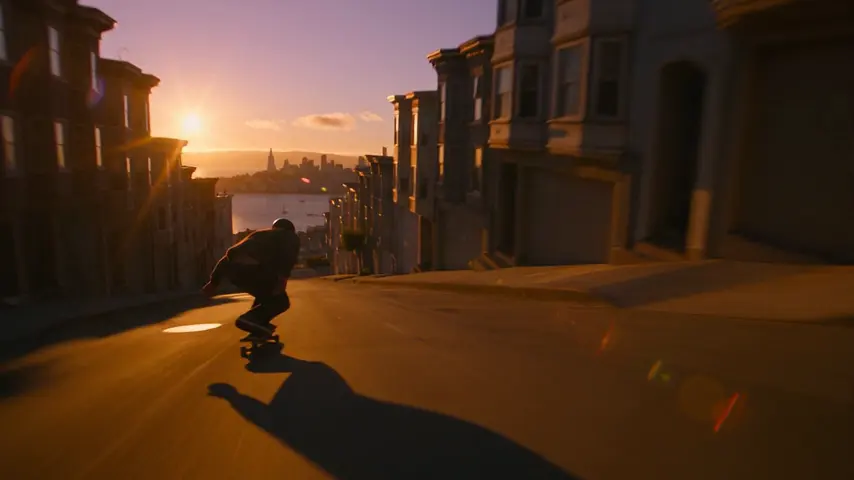
Tracking shot alongside a skateboarder bombing down a steep San Francisco street at golden hour, low angle, motion blur
Confidentialité
Privé et sans restrictions
- →Aucun filtre sur les moteurs d’eroq : une politique écrite à la place.
- →Ils ne gardent rien, et rien ne s’entraîne sur ton travail.
- →Le mode privé ne garde aucun fichier.